Virtual filesystem for AI assistants
How ChromaFs provides AI agents with structured file access.
Virtual Filesystem for AI Assistants: Replacing RAG with ChromaFs
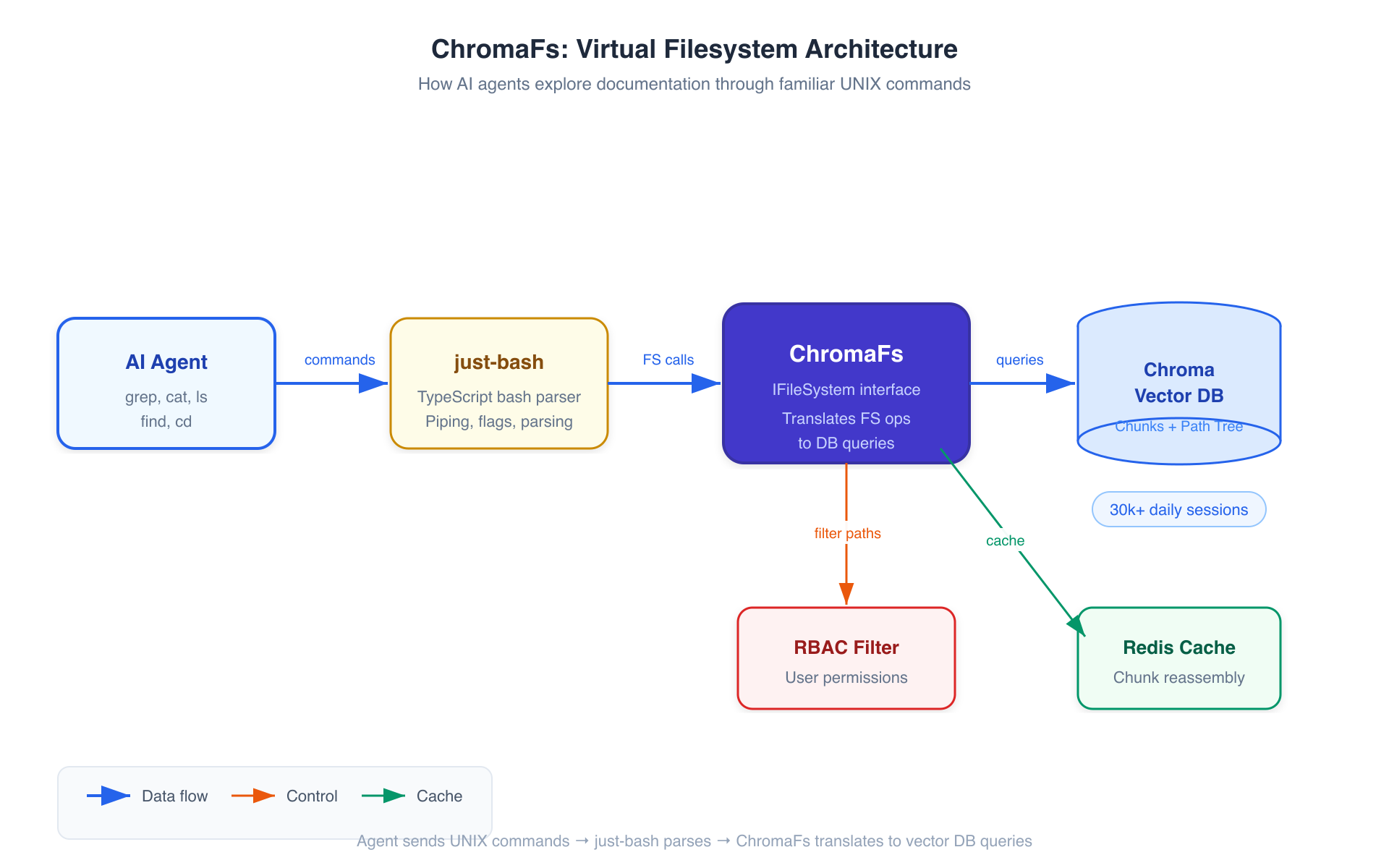 ChromaFs High-Level Architecture
This guide breaks down how Mintlify replaced traditional RAG with a virtual filesystem called ChromaFs to power their documentation assistant. The result: 460x faster session creation, zero marginal compute cost, and 30,000+ daily conversations served.
Based on the article by Dens Sumesh (formerly Trieve, now Mintlify).
Why This Matters
Traditional RAG (Retrieval-Augmented Generation) has been the default approach for giving AI assistants access to documentation. But as scale increases, its limitations become painfully obvious. Mintlify discovered that agents work better when they can explore documentation like developers explore code — using familiar tools like grep, ls, cat, and find.
Key numbers:
- 850,000 monthly conversations
- 30,000+ daily sessions
- Hundreds of thousands of users across different documentation sites
The Problem with Traditional RAG
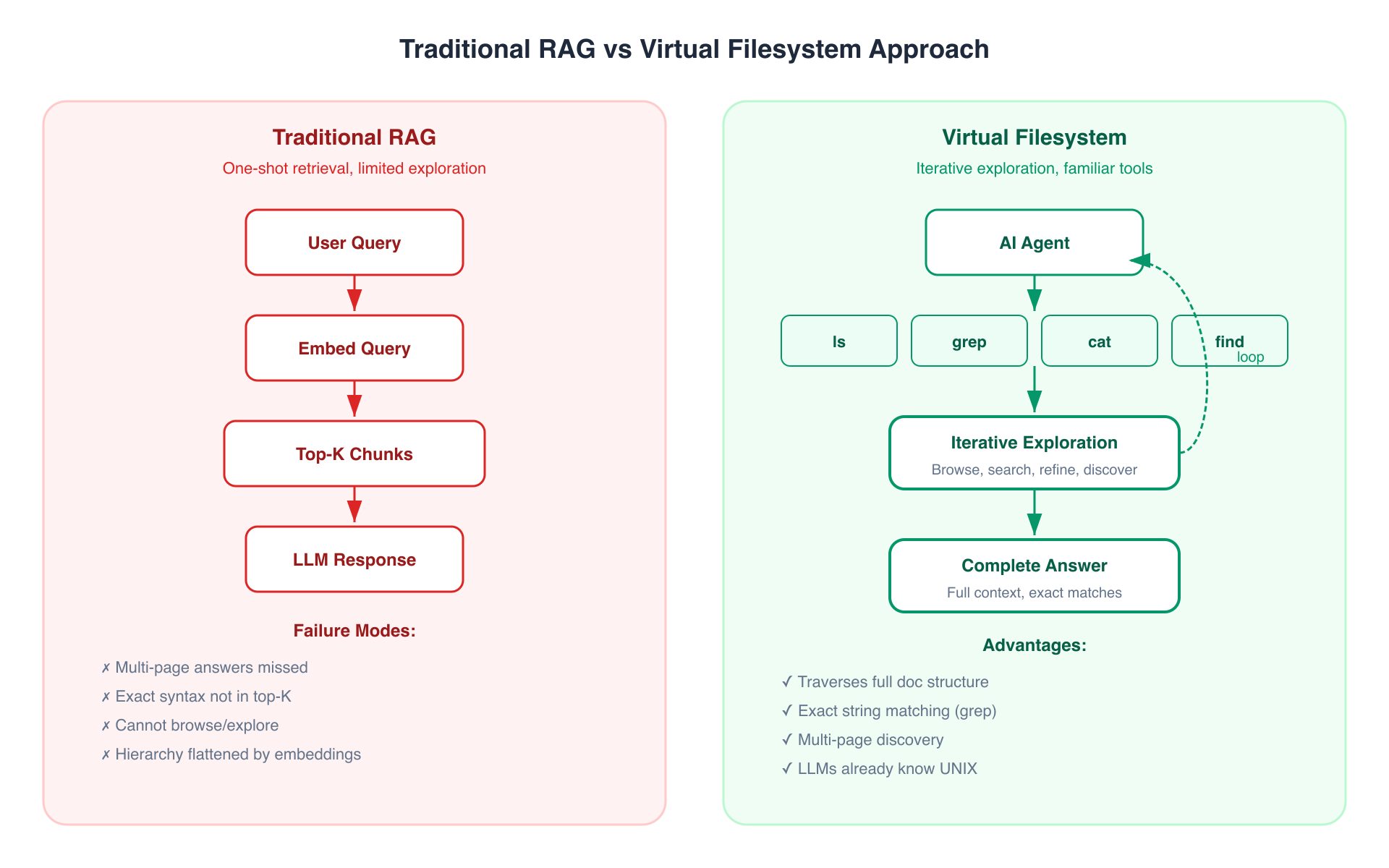 RAG vs Filesystem Approach
How RAG typically works
- User asks a question
- The query is embedded into a vector
- Top-K most similar chunks are retrieved
- Those chunks are fed to the LLM as context
Where it breaks down
| Failure Mode | Example |
|---|---|
| Multi-page answers | "How do I set up OAuth end-to-end?" spans 3 pages |
| Exact syntax needs | Looking for a specific API endpoint URL that doesn't match semantically |
| Exploration | "What authentication options exist?" requires browsing, not searching |
| Flat retrieval | Embeddings lose hierarchical structure of documentation |
The core insight
Agents converge on filesystems as their primary interface.
grep,cat,ls, andfindare all an agent needs. If each doc page is a file and each section is a directory, the agent can search for exact strings, read full pages, and traverse the structure on its own.
LLMs are extensively trained on shell interactions. They already know how to use UNIX commands. Why fight this?
The Sandbox Attempt (and Why It Failed)
The obvious first attempt: give agents access to a real filesystem inside an isolated sandbox container.
How it worked
- Spin up a sandbox container for each conversation
- Clone the documentation repo from GitHub
- Mount it as a filesystem
- Let the agent use
grep,cat, etc. on actual files
Why it was too expensive
| Metric | Value |
|---|---|
| P90 session creation time | ~46 seconds |
| Resources per session | 1 vCPU, 2GB RAM |
| Session duration | ~5 minutes |
| Monthly conversations | 850,000 |
| Annual infrastructure cost | ~$70,000+ |
The startup latency alone (cloning repos, installing dependencies) made it unacceptable for a chat-like UX. Users expect near-instant responses.
The Solution: ChromaFs
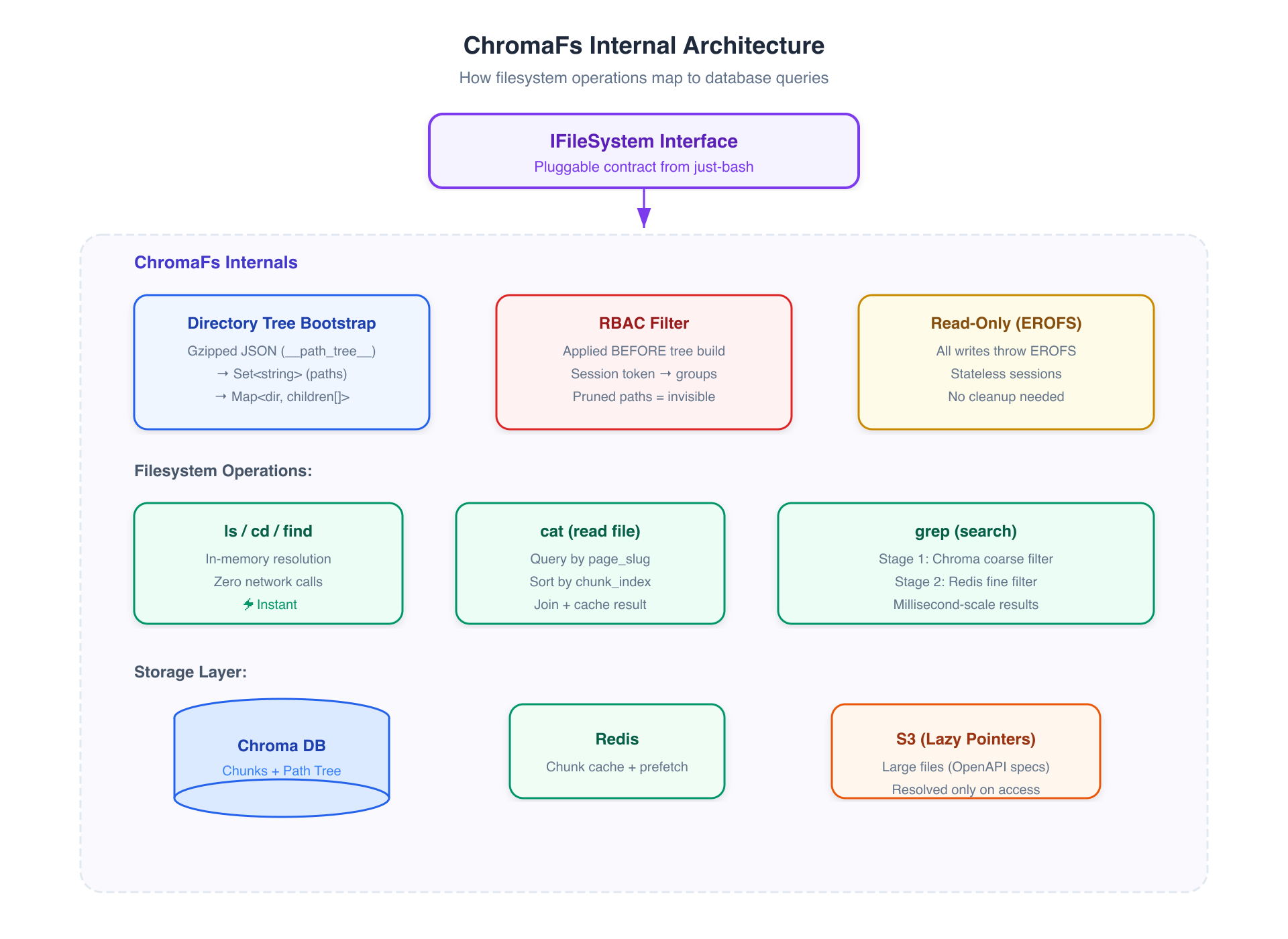 ChromaFs Architecture
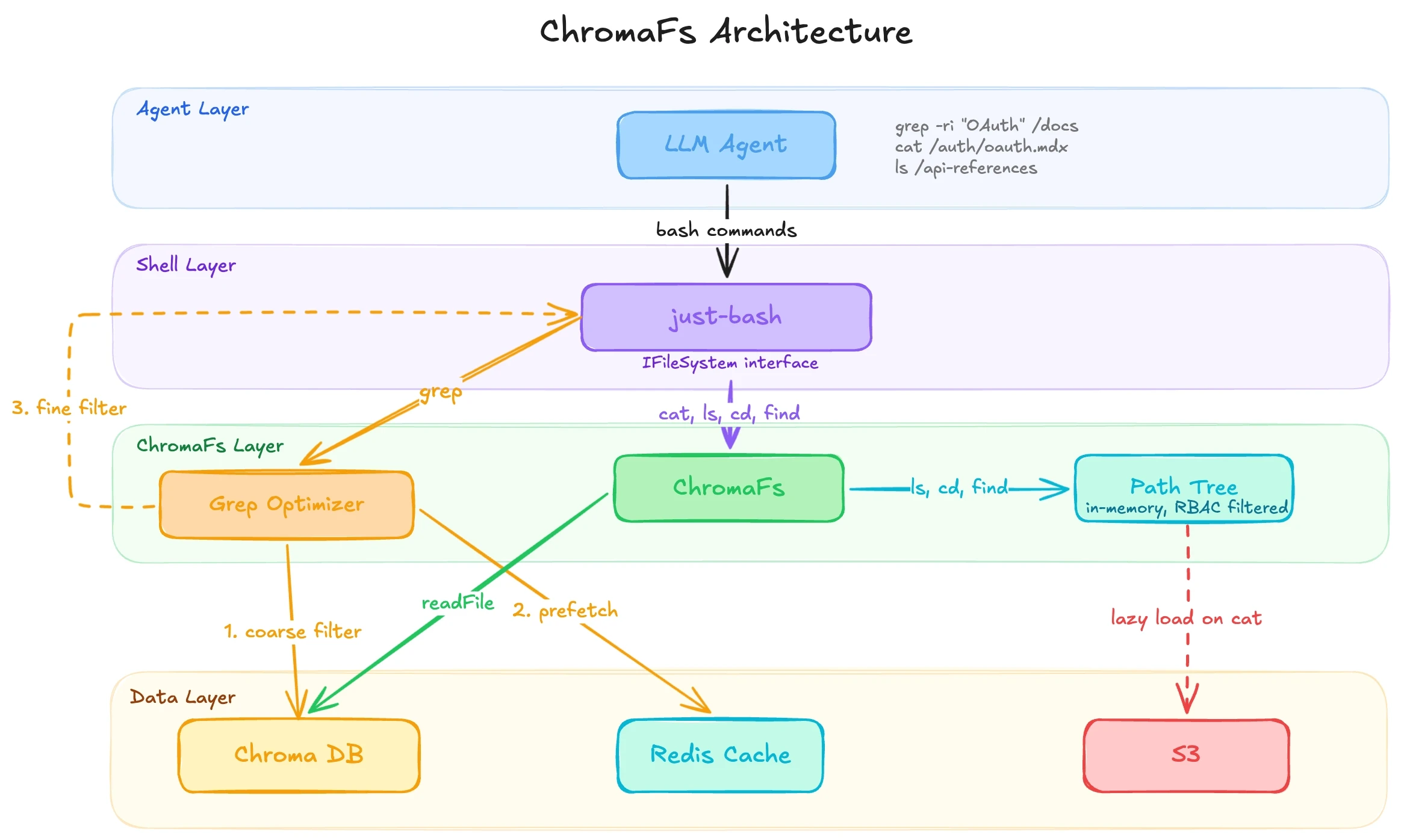 ChromaFs System Architecture
ChromaFs is a virtual filesystem that intercepts UNIX commands and translates them into queries against an existing Chroma vector database — where documentation is already indexed, chunked, and stored.
Key design decisions
- No new infrastructure — reuses the Chroma DB that already powers search
- Built on just-bash — Vercel Labs' TypeScript reimplementation of bash
- Pluggable interface — just-bash handles parsing/piping/flags; ChromaFs only implements the filesystem layer
- Read-only — agents can explore but never modify
The IFileSystem interface
just-bash exposes a pluggable IFileSystem interface. This means:
- just-bash handles: command parsing, piping (
|), flag logic, output formatting - ChromaFs implements: file reads, directory listings, search queries
The agent thinks it's using a normal filesystem. Under the hood, every operation becomes a database query.
How It Works: Key Mechanisms
Directory Tree Bootstrap
Documentation structure is stored as gzipped JSON in Chroma under a special key (__path_tree__):
{
  "auth/oauth": { "isPublic": true, "groups": [] },
  "auth/saml": { "isPublic": true, "groups": [] },
  "internal/billing": { "isPublic": false, "groups": ["admin", "billing"] },
  "api/endpoints": { "isPublic": true, "groups": [] }
}
On initialization, ChromaFs decompresses this into two in-memory structures:
Set<string>— all file paths (for existence checks)Map<string, string[]>— directory-to-children mapping (forls)
This means ls, cd, and find resolve locally in memory with zero network calls.
Chunk Reassembly (how cat works)
When the agent runs cat /auth/oauth.mdx:
- ChromaFs queries Chroma for all chunks where
page_slug = "auth/oauth" - Results are sorted by
chunk_index - Chunks are joined into the complete page content
- Result is cached to prevent redundant DB hits on re-reads
For large files (like OpenAPI specs stored in S3), ChromaFs registers lazy file pointers — content is only fetched on actual access, not during tree initialization.
Two-Stage Grep Optimization
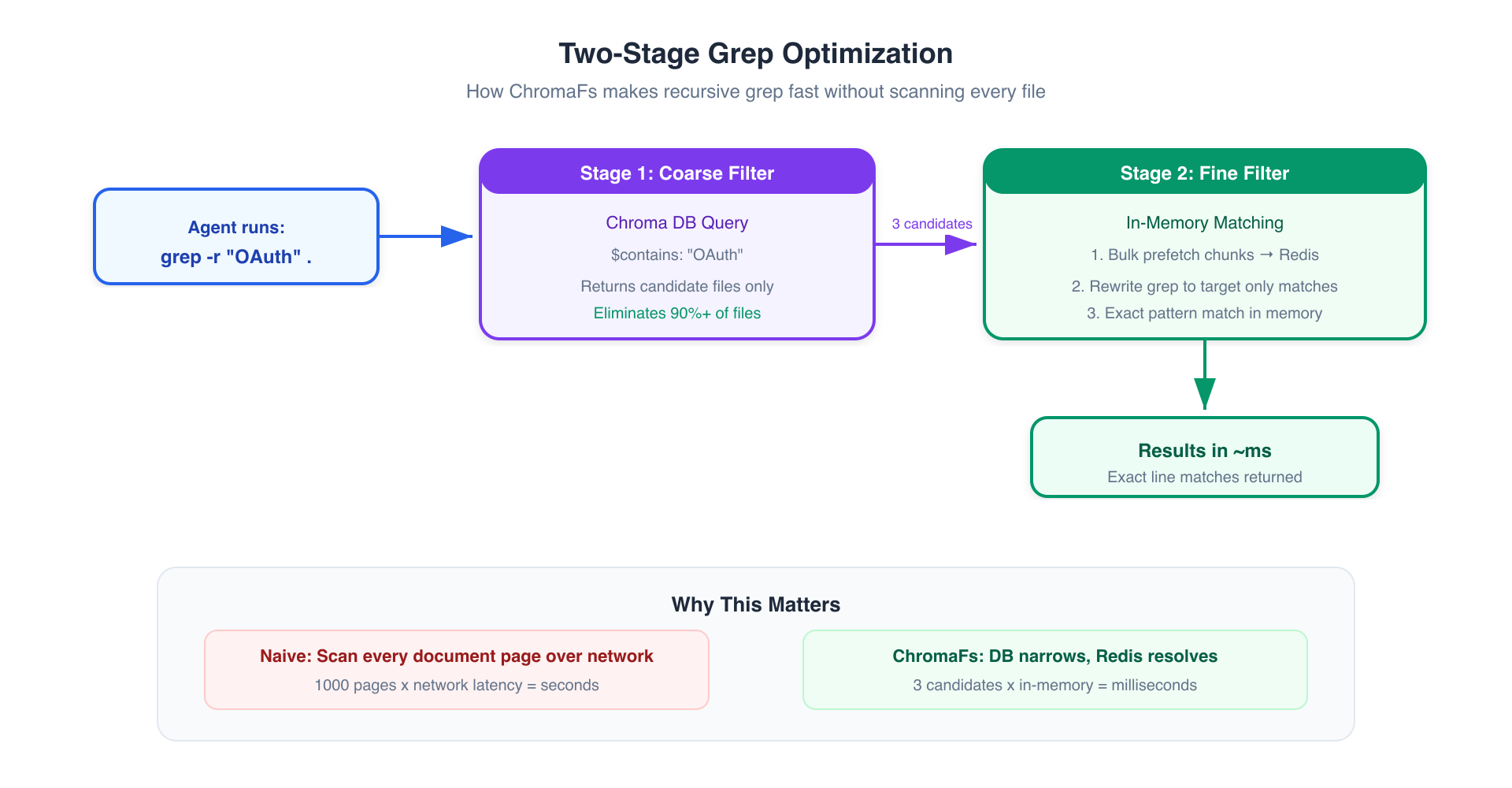 Grep Optimization Flow
Recursive grep (grep -r "pattern" .) is the most expensive operation. ChromaFs uses a clever two-stage approach:
Stage 1 — Coarse filter (Chroma)
- Translate the grep pattern into a Chroma
$containsor regex query - Database returns only candidate files that might match
- This eliminates 90%+ of files immediately
Stage 2 — Fine filter (in-memory)
- Bulk-prefetch matched chunks into Redis
- Rewrite the grep command to target only candidate files
- Run actual pattern matching in memory
Result: millisecond-scale performance instead of scanning every document page over the network.
RBAC at the Filesystem Level
Access control is enforced before the file tree is built:
- User's session token is read
- Permission groups are extracted
- The
__path_tree__JSON is filtered — only accessible paths are included - The in-memory tree is built from the filtered result
Agents literally cannot see, reference, or access pruned paths. It's as if restricted files don't exist.
Read-Only Safety
All write operations (mkdir, touch, echo >, rm) throw EROFS (Read-Only File System) errors. This provides:
- Stateless sessions — no cleanup needed after conversations end
- No interference — agents can't modify docs or affect other users
- Simplicity — no need for copy-on-write or snapshotting
Performance Results
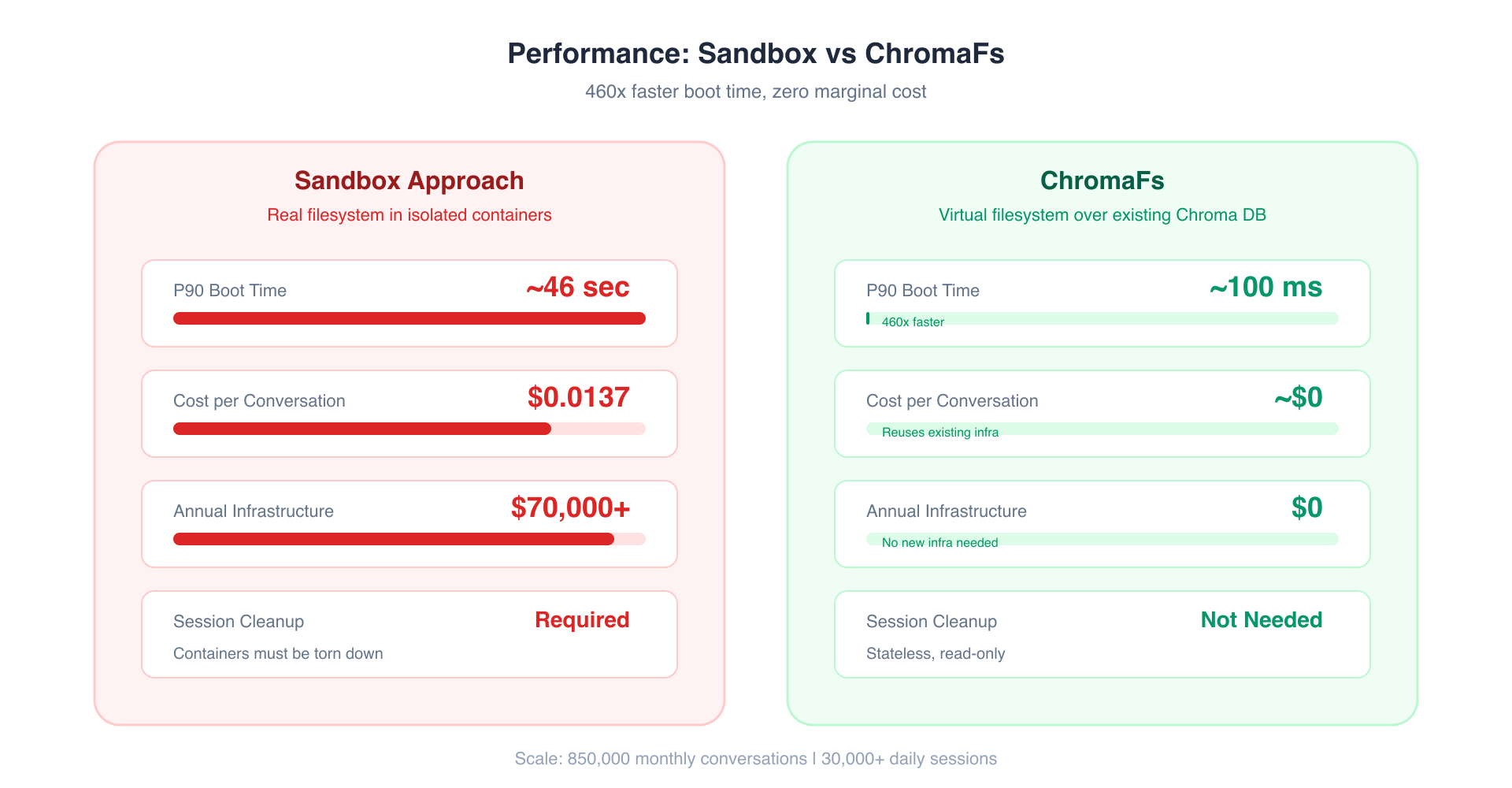 Performance Comparison
| Metric | Sandbox | ChromaFs | Improvement |
|---|---|---|---|
| P90 boot time | ~46 seconds | ~100 milliseconds | 460x faster |
| Marginal cost per conversation | ~$0.0137 | ~$0 | Effectively free |
| Annual infra cost (850k/mo) | ~$70,000+ | $0 (reuses existing DB) | 100% savings |
| Search mechanism | Linear disk scans | Database queries | Orders of magnitude |
| Session cleanup | Required (containers) | Not needed (stateless) | Zero ops burden |
Key Takeaways
For AI agent builders
- Filesystem interfaces are natural for agents — LLMs are trained on massive amounts of shell interaction data. They already know
grep,cat,ls,find. Don't invent custom tool APIs when standard UNIX commands work better. - Agentic search beats one-shot retrieval — Instead of "query once, hope for the best," let agents iteratively explore. They can refine searches, follow leads, and build understanding progressively.
- Exact matching still matters — Embeddings flatten information and lose precision for technical terms, acronyms, and exact syntax. A hybrid approach (or filesystem grep) preserves what semantic search loses.
- Virtual > Real for read-only workloads — If agents only need to read, don't spin up real filesystems. Map the interface they expect to the storage you already have.
- RBAC belongs at the data layer — Don't try to teach agents about permissions. Just make unauthorized data invisible at the filesystem level.
The bigger picture
This represents a shift from "RAG finds context for the AI" to "AI discovers context on its own." The retrieval isn't the bottleneck — the abstraction is. Give agents familiar tools and hierarchical structure, and they'll find what they need.